---
title: Qwen3-Coder-480B-A35B-Instruct-AWQ
canonical_url: "https://www.modelscope.ai/models/swift/Qwen3-Coder-480B-A35B-Instruct-AWQ"
md_url: "https://www.modelscope.ai/models/swift/Qwen3-Coder-480B-A35B-Instruct-AWQ.md"
repository: swift/Qwen3-Coder-480B-A35B-Instruct-AWQ
last_updated: 2025-09-04
license: apache-2.0
pipeline_tag: text-generation
tasks:
- text-generation
model_type:
- qwen3_moe
base_model:
- Qwen/Qwen3-Coder-480B-A35B-Instruct
base_model_relation: quantized
library_name:
- transformer
- safetensors
- pytorch
frameworks:
- Pytorch
downloads: 675
stars: 2
---
# Qwen3-Coder-480B-A35B-Instruct-AWQ
> Qwen3-Coder-480B-A35B-Instruct-AWQ - An open-source model by swift on ModelScope. Qwen3-Coder-480B-A35B-Instruct-AWQ
swift/Qwen3-Coder-480B-A35B-Instruct-AWQ is a text-generation model on ModelScope. licensed under apache-2.0. derived from Qwen/Qwen3-Coder-480B-A35B-Instruct.
- **Repository**: swift/Qwen3-Coder-480B-A35B-Instruct-AWQ
- **License**: apache-2.0
- **Tasks**: text-generation
- **Base model**: Qwen/Qwen3-Coder-480B-A35B-Instruct
- **Downloads**: 675
- **Stars**: 2
- **Last updated**: 2025-09-04
Source: https://www.modelscope.ai/models/swift/Qwen3-Coder-480B-A35B-Instruct-AWQ
---
# Qwen3-Coder-480B-A35B-Instruct-AWQ
## Introduction
The AWQ version is quantized using [ms-swift](https://github.com/modelscope/ms-swift). The AWQ models for Qwen3-Coder-480B-A35B-Instruct have been verified to work with both Transformers and vLLM.
## Inference
use transformers:
```python
from transformers import AutoModelForCausalLM, AutoTokenizer
model_name = "swift/Qwen3-Coder-480B-A35B-Instruct-AWQ"
# load the tokenizer and the model
tokenizer = AutoTokenizer.from_pretrained(model_name)
model = AutoModelForCausalLM.from_pretrained(
model_name,
torch_dtype="auto",
device_map="auto"
)
# prepare the model input
prompt = "Write a quick sort algorithm."
messages = [
{"role": "user", "content": prompt}
]
text = tokenizer.apply_chat_template(
messages,
tokenize=False,
add_generation_prompt=True,
)
model_inputs = tokenizer([text], return_tensors="pt").to(model.device)
# conduct text completion
generated_ids = model.generate(
**model_inputs,
max_new_tokens=65536
)
output_ids = generated_ids[0][len(model_inputs.input_ids[0]):].tolist()
content = tokenizer.decode(output_ids, skip_special_tokens=True)
print("content:", content)
```
use vllm:
```shell
VLLM_USE_MODELSCOPE=true vllm serve \
swift/Qwen3-Coder-480B-A35B-Instruct-AWQ \
--tensor-parallel-size 4 \
--max-model-len 32768
```
use ms-swift:
```shell
# pip install git+https://github.com/modelscope/ms-swift.git
swift infer \
--model swift/Qwen3-Coder-480B-A35B-Instruct-AWQ \
--infer_backend vllm \
--vllm_tensor_parallel_size 4 \
--vllm_max_model_len 32768
```
## Quantization
The model has undergone AWQ int4 quantization using the [ms-swift](https://github.com/modelscope/ms-swift) framework.
Quantization command:
```shell
swift export \
--model Qwen/Qwen3-Coder-480B-A35B-Instruct \
--dataset 'qwen3_coder_480b.jsonl' \
--device_map cpu \
--quant_n_samples 256 \
--quant_batch_size -1 \
--attn_impl flash_attn \
--max_length 8192 \
--quant_method awq \
--quant_bits 4 \
--output_dir Qwen3-Coder-480B-A35B-Instruct-AWQ
```
If you have fine-tuned the model and wish to quantize the fine-tuned version, you can refer to the following quantization scripts:
- Dense Model Quantization Script: [View Here](https://github.com/modelscope/ms-swift/blob/main/examples/export/quantize/awq.sh)
- MoE Model Quantization Script: [View Here](https://github.com/modelscope/ms-swift/blob/main/examples/export/quantize/moe/awq.sh)
With these scripts, you can easily complete the quantization process for the model.
# Qwen3-Coder-480B-A35B-Instruct
 ## Highlights
Today, we're announcing **Qwen3-Coder**, our most agentic code model to date. **Qwen3-Coder** is available in multiple sizes, but we're excited to introduce its most powerful variant first: **Qwen3-Coder-480B-A35B-Instruct**. featuring the following key enhancements:
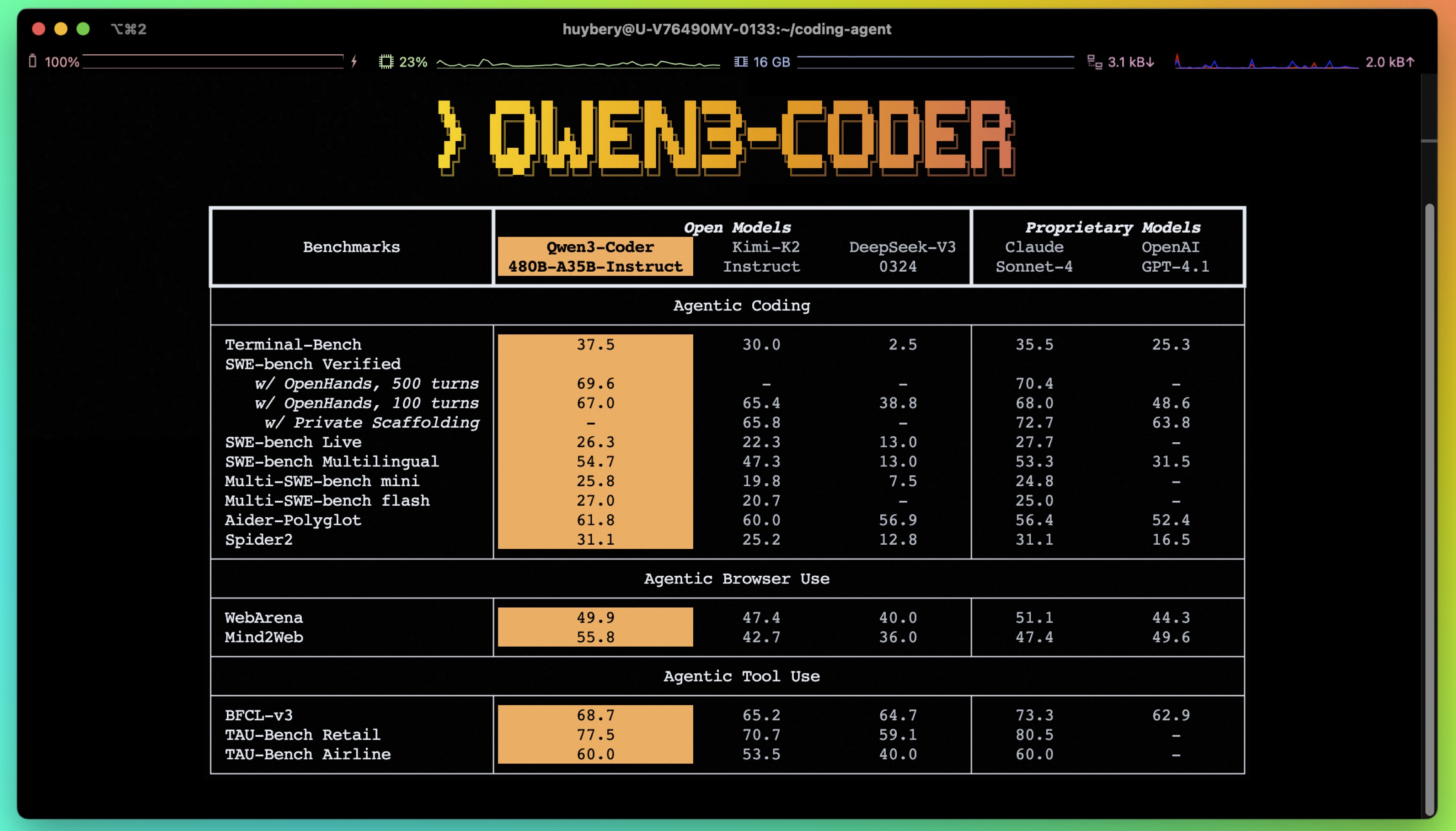
- **Significant Performance** among open models on **Agentic Coding**, **Agentic Browser-Use**, and other foundational coding tasks, achieving results comparable to Claude Sonnet.
- **Long-context Capabilities** with native support for **256K** tokens, extendable up to **1M** tokens using Yarn, optimized for repository-scale understanding.
- **Agentic Coding** supporting for most platform such as **Qwen Code**, **CLINE**, featuring a specially designed function call format.
## Model Overview
**Qwen3-480B-A35B-Instruct** has the following features:
- Type: Causal Language Models
- Training Stage: Pretraining & Post-training
- Number of Parameters: 480B in total and 35B activated
- Number of Layers: 62
- Number of Attention Heads (GQA): 96 for Q and 8 for KV
- Number of Experts: 160
- Number of Activated Experts: 8
- Context Length: **262,144 natively**.
**NOTE: This model supports only non-thinking mode and does not generate ```` blocks in its output. Meanwhile, specifying `enable_thinking=False` is no longer required.**
For more details, including benchmark evaluation, hardware requirements, and inference performance, please refer to our [blog](https://qwenlm.github.io/blog/qwen3-coder/), [GitHub](https://github.com/QwenLM/Qwen3-Coder), and [Documentation](https://qwen.readthedocs.io/en/latest/).
## Quickstart
We advise you to use the latest version of `transformers`.
With `transformers<4.51.0`, you will encounter the following error:
```
KeyError: 'qwen3_moe'
```
The following contains a code snippet illustrating how to use the model generate content based on given inputs.
```python
from transformers import AutoModelForCausalLM, AutoTokenizer
model_name = "Qwen/Qwen3-480B-A35B-Instruct"
# load the tokenizer and the model
tokenizer = AutoTokenizer.from_pretrained(model_name)
model = AutoModelForCausalLM.from_pretrained(
model_name,
torch_dtype="auto",
device_map="auto"
)
# prepare the model input
prompt = "Write a quick sort algorithm."
messages = [
{"role": "user", "content": prompt}
]
text = tokenizer.apply_chat_template(
messages,
tokenize=False,
add_generation_prompt=True,
)
model_inputs = tokenizer([text], return_tensors="pt").to(model.device)
# conduct text completion
generated_ids = model.generate(
**model_inputs,
max_new_tokens=65536
)
output_ids = generated_ids[0][len(model_inputs.input_ids[0]):].tolist()
content = tokenizer.decode(output_ids, skip_special_tokens=True)
print("content:", content)
```
**Note: If you encounter out-of-memory (OOM) issues, consider reducing the context length to a shorter value, such as `32,768`.**
For local use, applications such as Ollama, LMStudio, MLX-LM, llama.cpp, and KTransformers have also supported Qwen3.
## Agentic Coding
Qwen3-Coder excels in tool calling capabilities.
You can simply define or use any tools as following example.
```python
# Your tool implementation
def square_the_number(num: float) -> dict:
return num ** 2
# Define Tools
tools=[
{
"type":"function",
"function":{
"name": "square_the_number",
"description": "output the square of the number.",
"parameters": {
"type": "object",
"required": ["input_num"],
"properties": {
'input_num': {
'type': 'number',
'description': 'input_num is a number that will be squared'
}
},
}
}
}
]
import OpenAI
# Define LLM
client = OpenAI(
# Use a custom endpoint compatible with OpenAI API
base_url='http://localhost:8000/v1', # api_base
api_key="EMPTY"
)
messages = [{'role': 'user', 'content': 'square the number 1024'}]
completion = client.chat.completions.create(
messages=messages,
model="Qwen3-Coder-480B-A35B-Instruct",
max_tokens=65536,
tools=tools,
)
print(completion.choice[0])
```
## Best Practices
To achieve optimal performance, we recommend the following settings:
1. **Sampling Parameters**:
- We suggest using `temperature=0.7`, `top_p=0.8`, `top_k=20`, `repetition_penalty=1.05`.
2. **Adequate Output Length**: We recommend using an output length of 65,536 tokens for most queries, which is adequate for instruct models.
### Citation
If you find our work helpful, feel free to give us a cite.
```
@misc{qwen3technicalreport,
title={Qwen3 Technical Report},
author={Qwen Team},
year={2025},
eprint={2505.09388},
archivePrefix={arXiv},
primaryClass={cs.CL},
url={https://arxiv.org/abs/2505.09388},
}
```