---
title: OXR-1.0
canonical_url: "https://www.modelscope.ai/models/SoMark/OXR-1.0"
md_url: "https://www.modelscope.ai/models/SoMark/OXR-1.0.md"
repository: SoMark/OXR-1.0
last_updated: 2026-10-21
model_type:
  - oxr
architectures:
  - OXR
parameters: 1.5B
tensor_type:
  - BF16
library_name:
  - safetensors
downloads: 6
stars: 0
---

# OXR-1.0

> OXR-1.0 - An open-source model by SoMark on ModelScope. 采用RSI训练，精度与速度双 SOTA 的开源文档解析模型

- **Repository**: SoMark/OXR-1.0
- **Parameters**: 1.5B
- **Downloads**: 6
- **Stars**: 0
- **Last updated**: 2026-10-21

Source: https://www.modelscope.ai/models/SoMark/OXR-1.0

---

<div align="center">

<img src="https://raw.githubusercontent.com/SoMarkAI/image_bed/main/OXR_README/assets/header.png" alt="" />

<h1>SoMark｜O<span style="color: #DE7802;">X</span>R</h1>

采用RSI训练，精度与速度双 SOTA 的开源文档解析模型

---

**让文档成为 Agent-Friendly 数据**

[🌐 Online Demo](https://free-oxr.somark.ai) ｜ [🔥 🆓 Free API](#free-api)

[![GitHub | OXR](https://img.shields.io/badge/GitHub-OXR-181717?style=flat-square&logo=github)](https://github.com/SoMarkAI/OXR)   [![Hugging Face | OXR-1.0](https://img.shields.io/badge/Hugging%20Face-OXR--1.0-F59E0B?style=flat-square)](https://huggingface.co/SoMarkAI/OXR-1.0)   [![ModelScope | OXR-1.0](https://img.shields.io/badge/ModelScope-OXR--1.0-624AFF?style=flat-square)](https://modelscope.cn/models/SoMark/OXR-1.0)   ![arXiv | Coming Soon](https://img.shields.io/badge/arXiv-Coming%20Soon-B31B1B?style=flat-square)


[English](https://github.com/SoMarkAI/OXR/blob/main/README.md) · **简体中文**

</div>

OXR（Optical Everything Recognition）是 SoMark 团队开源的SOTA文档解析模型，参数量1.3B，可将 PDF 和文档图片解析为 Agent-Friendly 数据（Markdown / JSON），并提供版面分析结果。

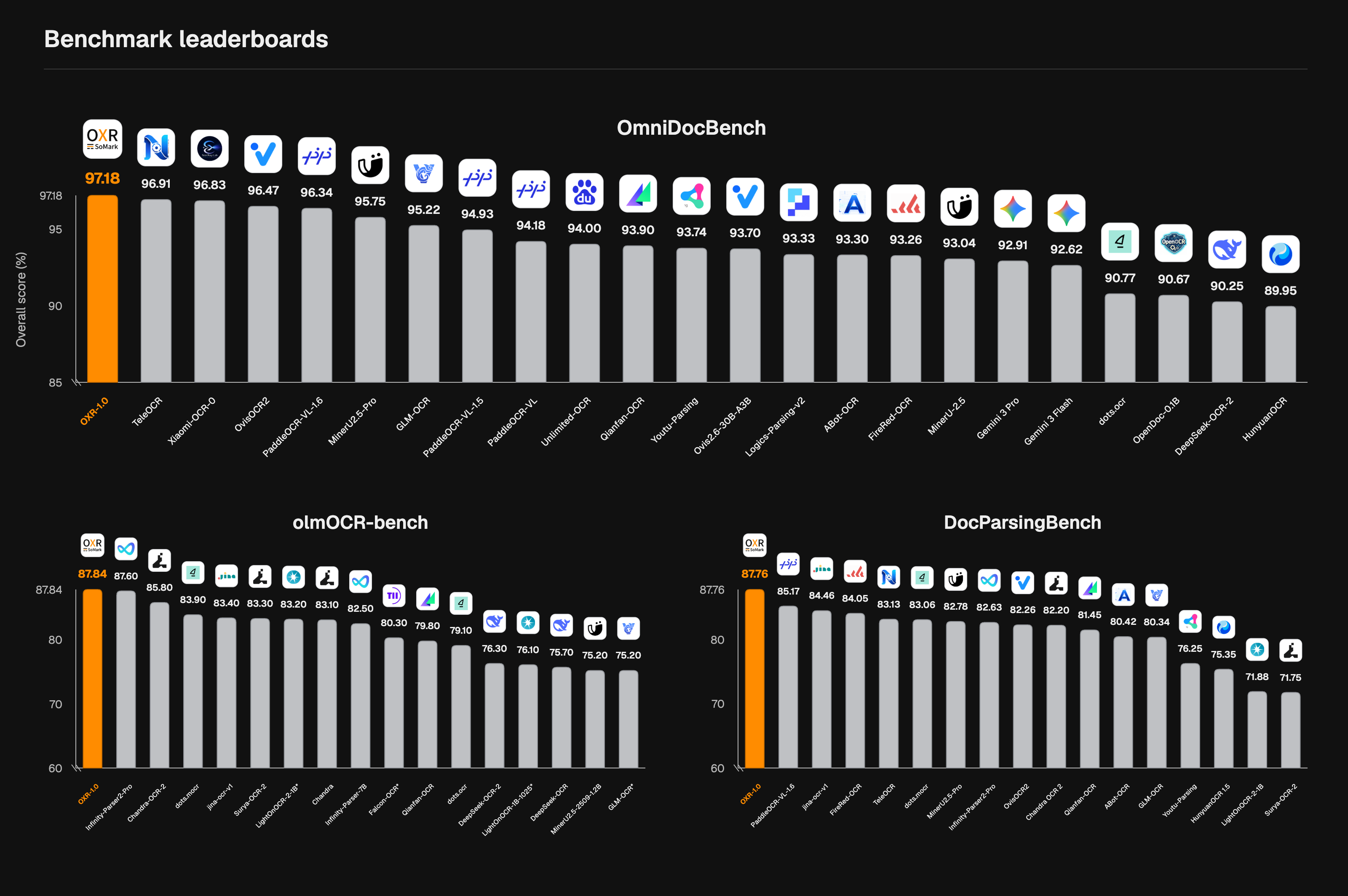
OXR从零开始预训练（Pretrained from Scratch），并在后训练阶段首次引入面向文档解析的递归自我改进（RSI）训练范式。在全球三大基准 OmniDocBench、olmOCR-Bench 和 DocParsingBench 测试中，OXR 均位列第一，同时解析速度也达到业内领先水平。

在架构设计上，OXR 首次将版面分析模块设计为独立、可插拔模块。在提升解析效率的同时，也让业务适配更加灵活。用户可根据业务对文档结构的要求，用自有模型替换内置的版面分析模型，以最小成本实现多场景适配。

![](https://raw.githubusercontent.com/SoMarkAI/image_bed/main/OXR_README/assets/three-benchmark-leaderboards.png)

![](https://raw.githubusercontent.com/SoMarkAI/image_bed/main/OXR_README/assets/speed-score-overview.png)

---

> 如果这个项目对你有帮助，请点击右上角 ⭐ Star 支持一下，这是对开发者最大的鼓励！


## Why OXR？

- 🎯 高精度解析，全球三榜第一

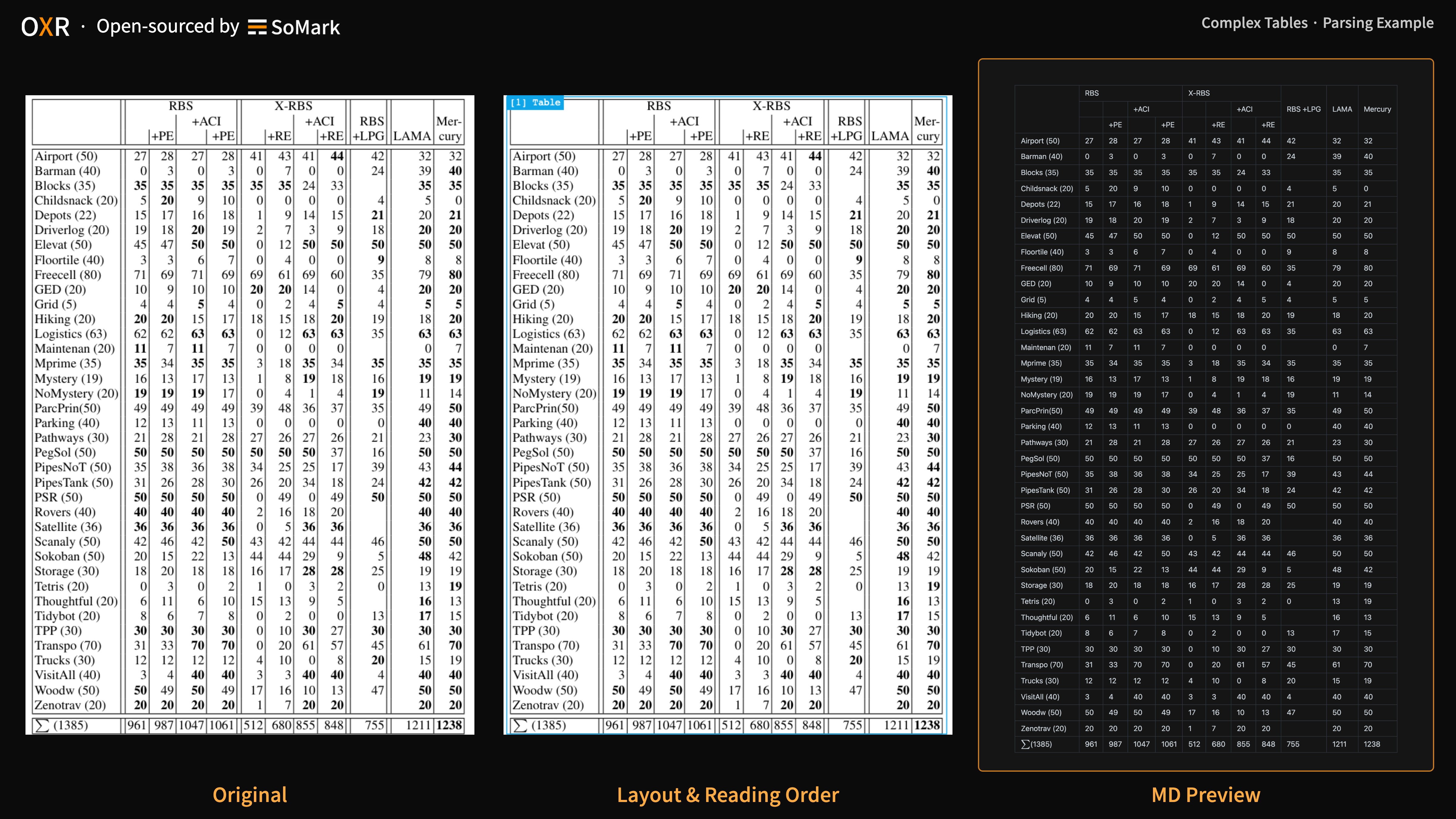
  - 在全球三大基准 OmniDocBench、olmOCR-Bench 和 DocParsingBench 测试中，OXR 均位列第一🏆，其中表格解析子项的优势尤为突出。
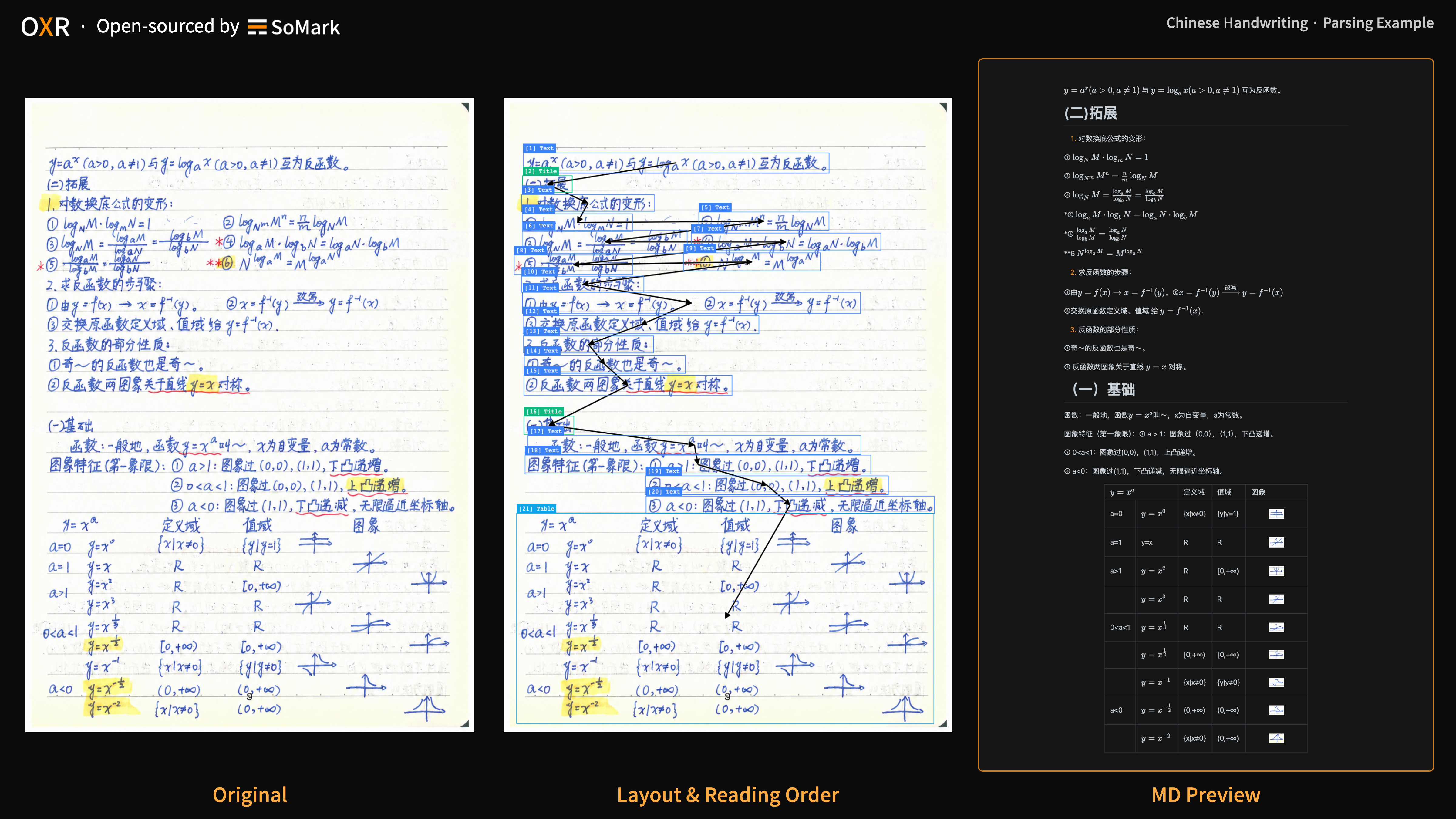
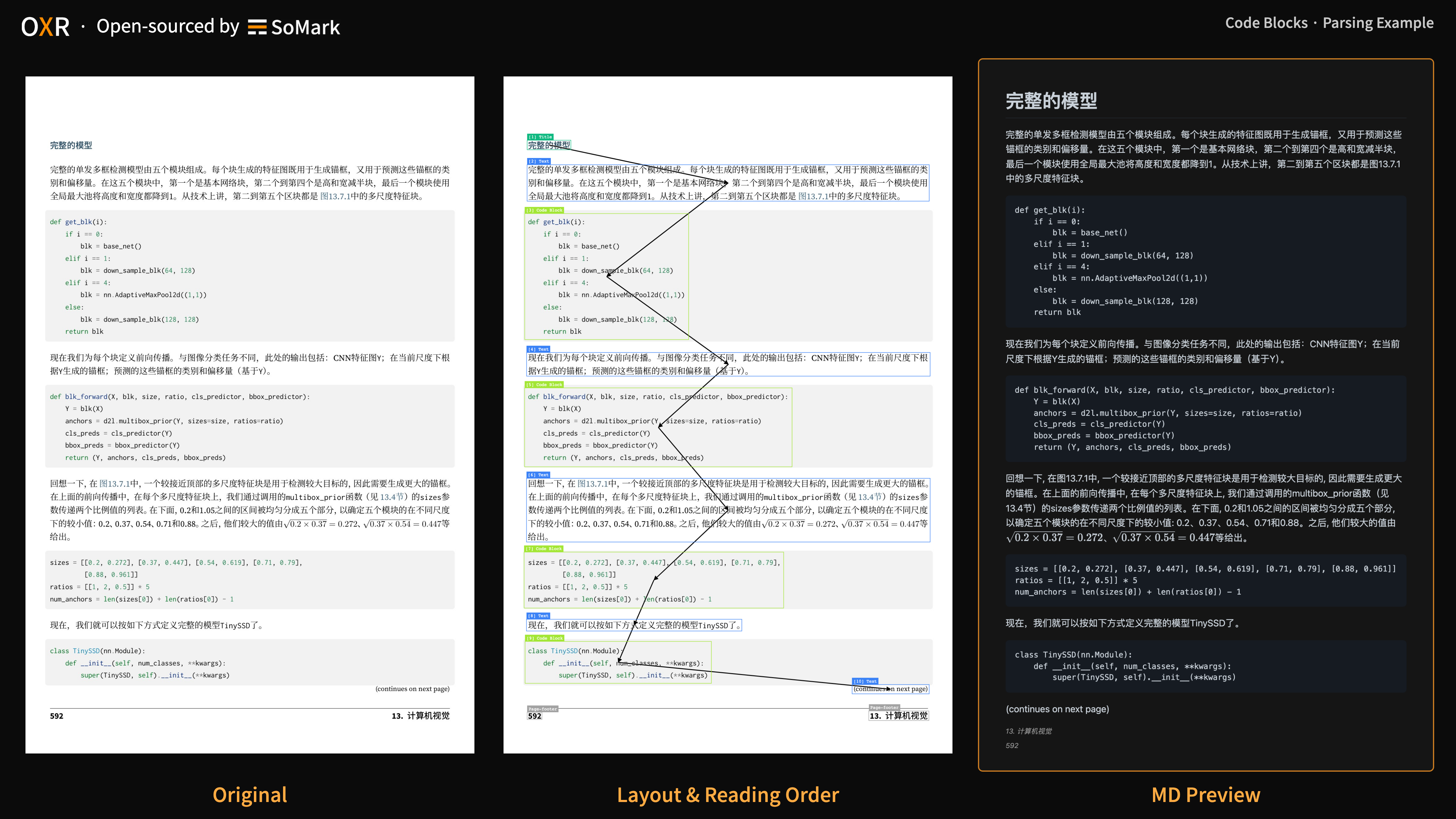
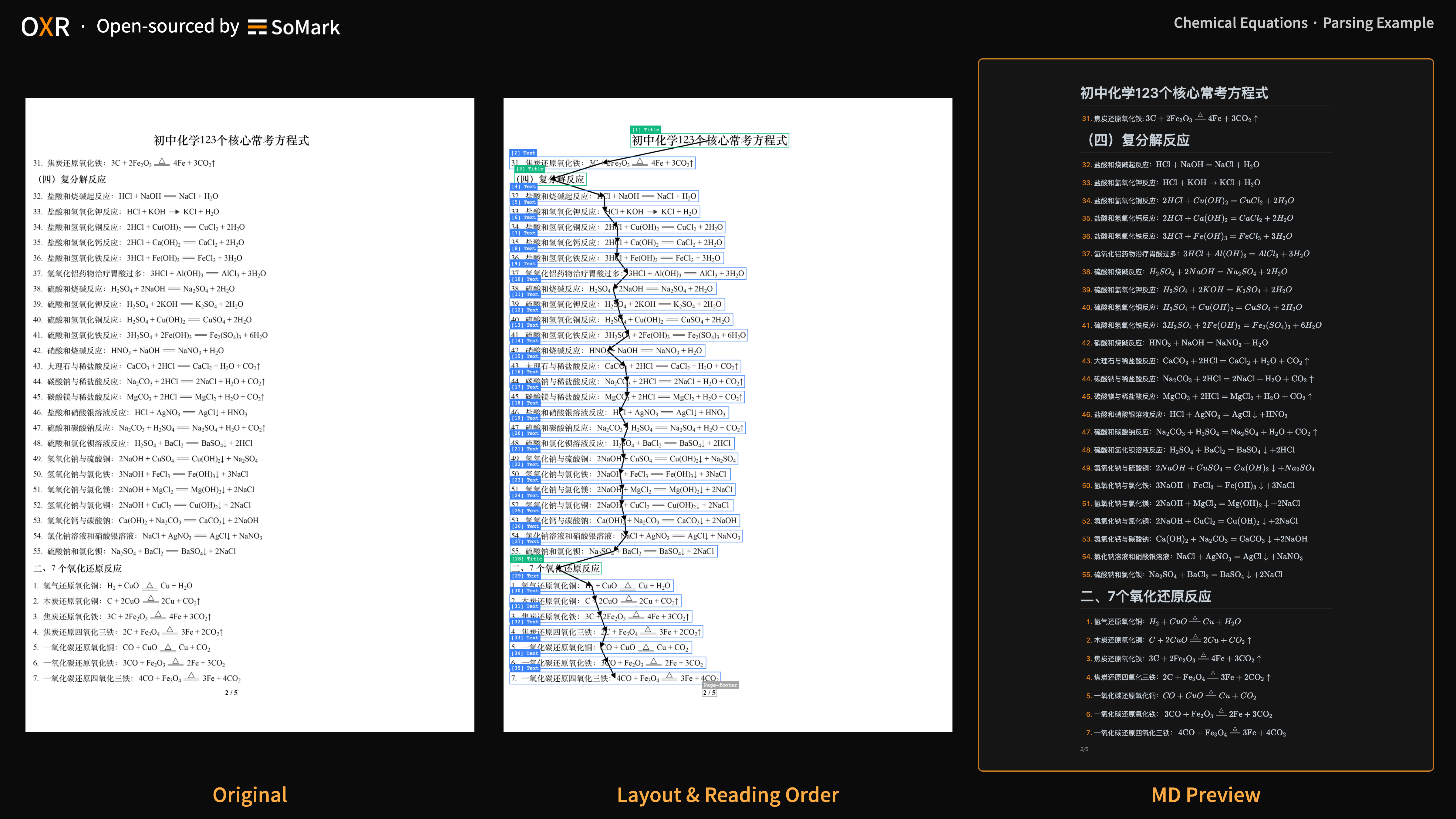
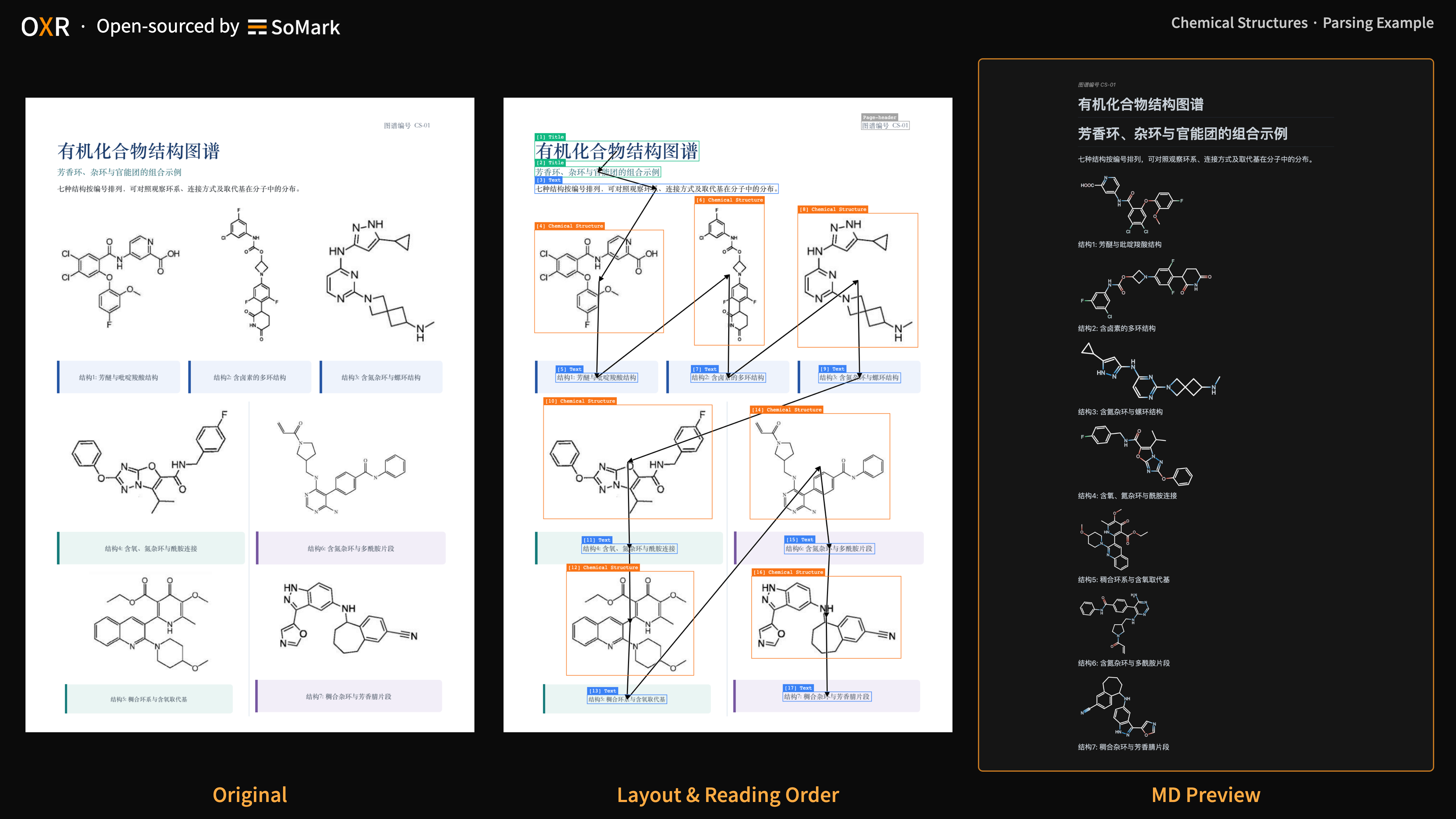
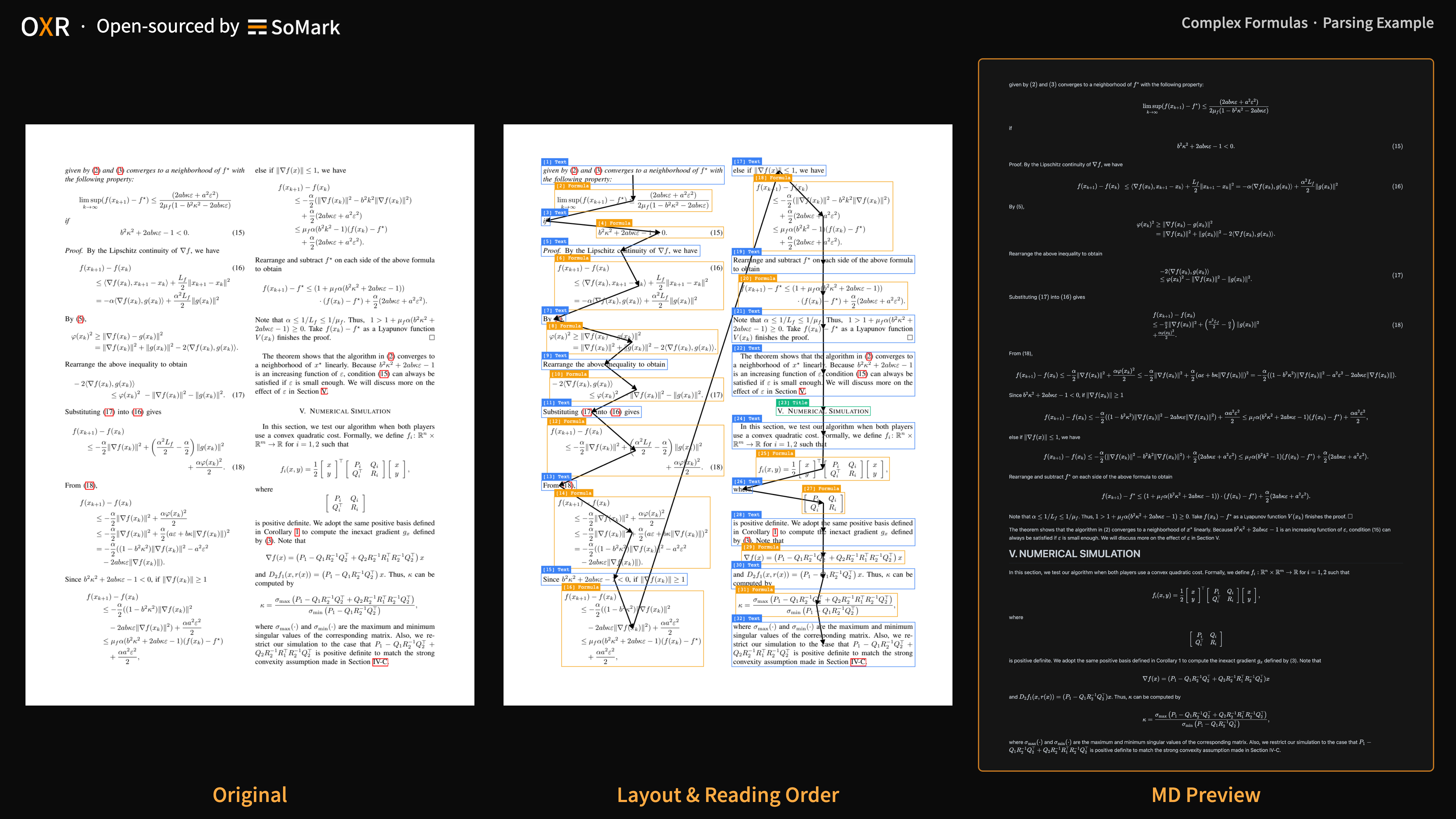
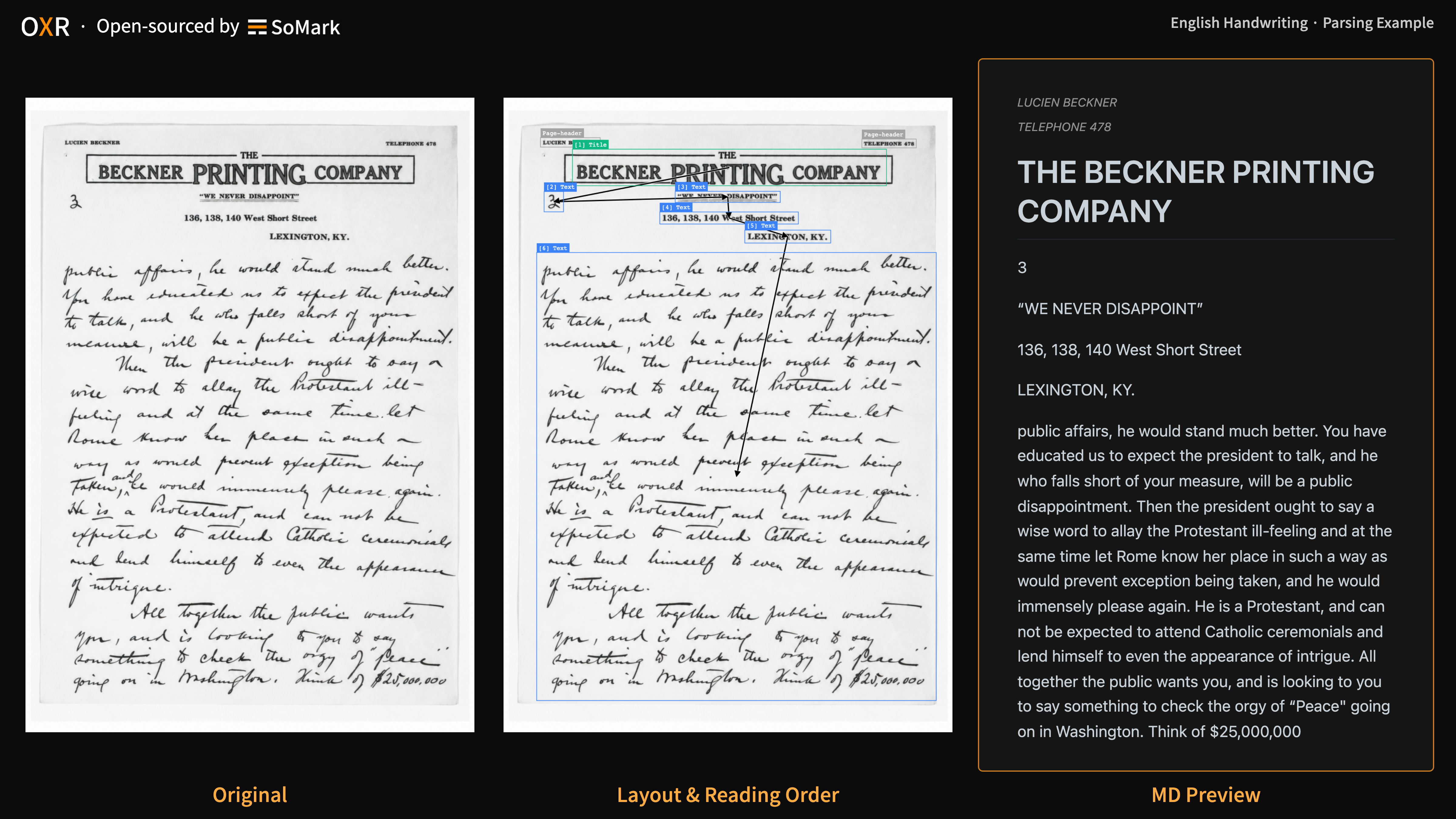
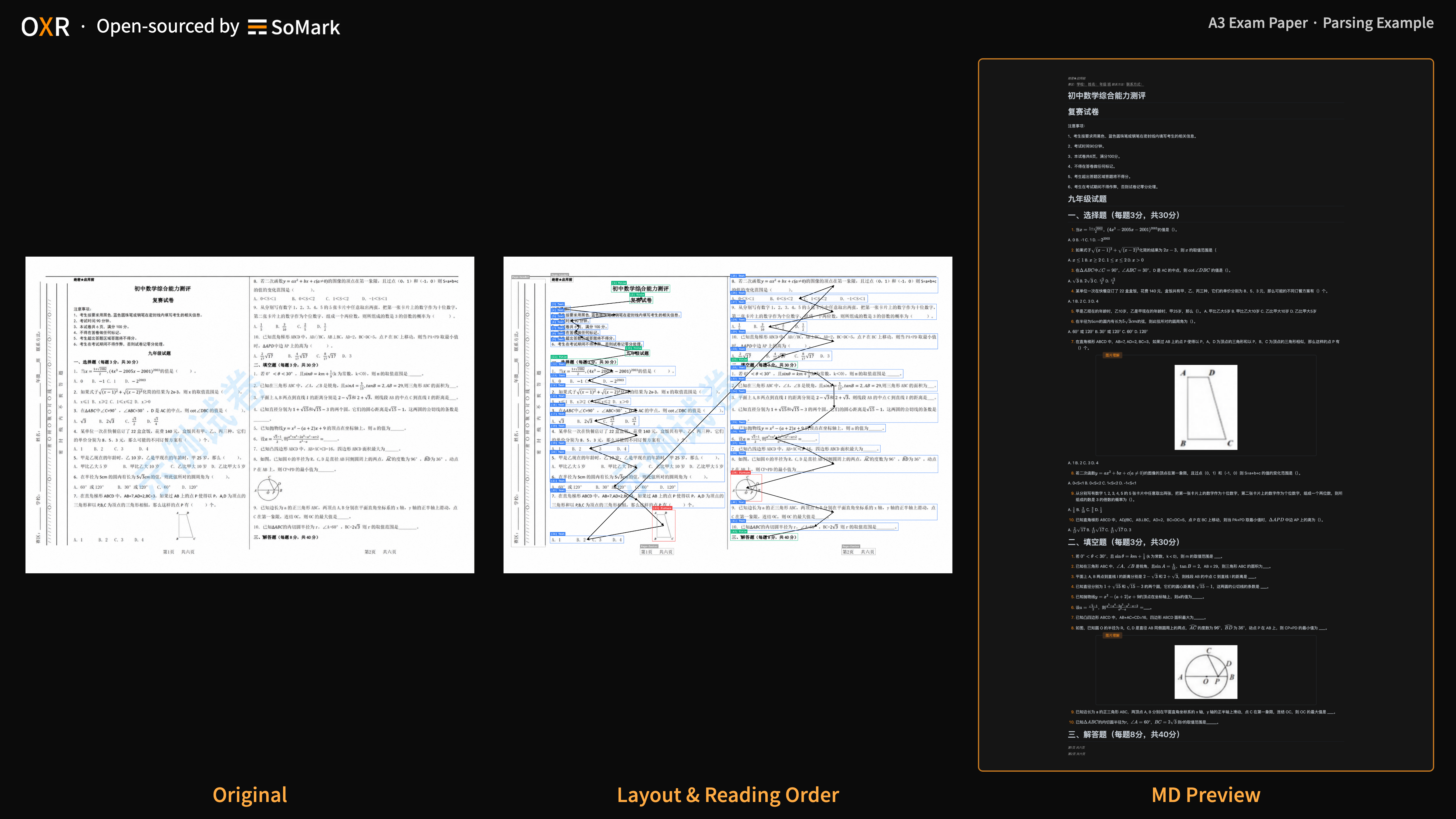
  - OXR 可识别公式、表格、化学方程式、化学结构式和代码块等 13 类文档元素，并提供对应的版面坐标；面对 A3 试卷、报纸等复杂版面，以及竖排文字和手写内容，也能保持良好解析效果。
  - 可前往 [docs/benchmark.md](https://github.com/SoMarkAI/OXR/blob/main/docs/benchmark.md) 中查阅完整数值并复现评测结果。
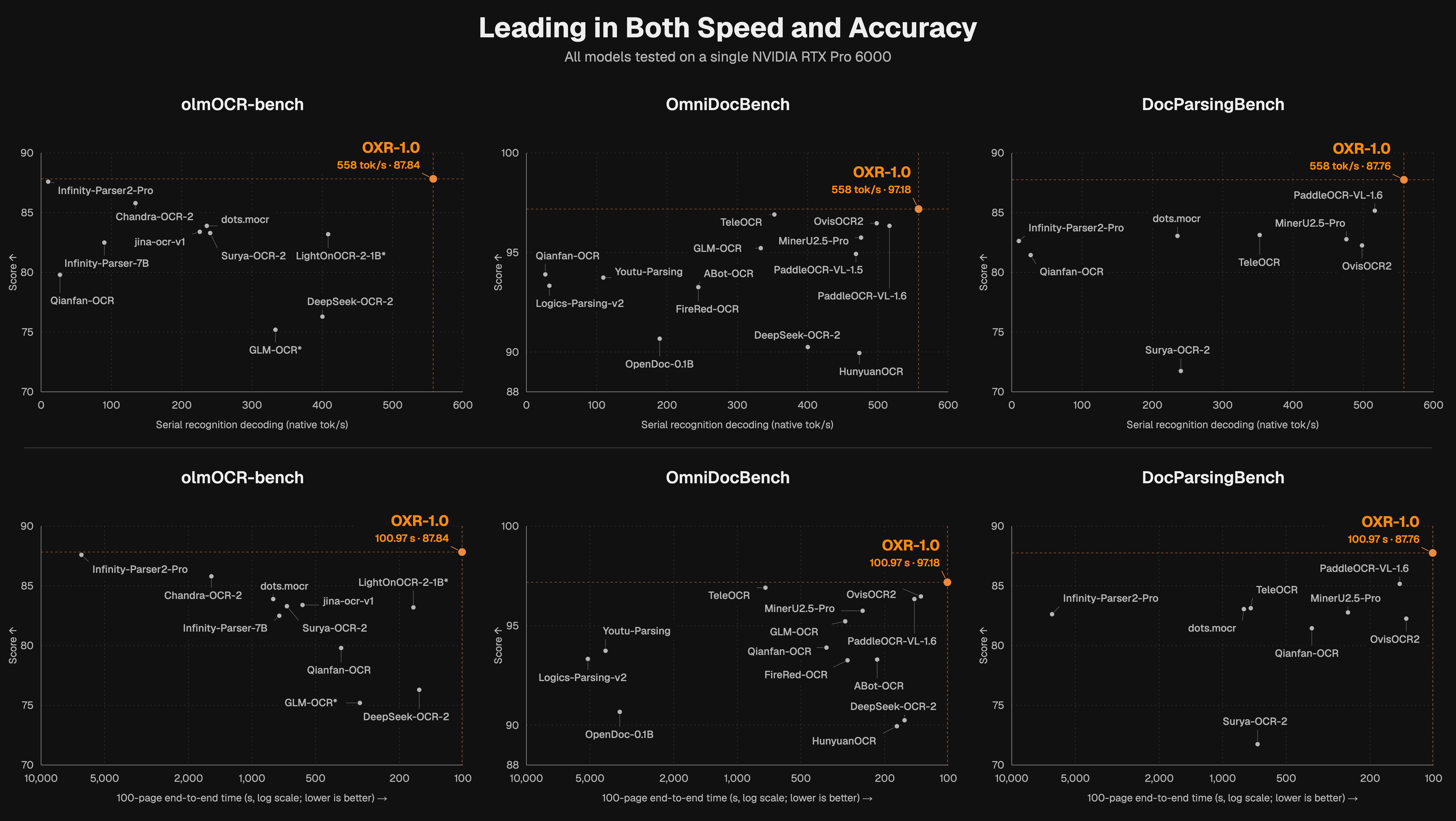
- 🚀 1.3B 参数，解析速度领先

  - OXR 仅 1.3B 参数，在 RTX PRO 6000 上的速度测试中位居开源文档解析模型第一🏆。
  - OXR 在任务层面重构了工作架构，实现在保持精度的同时解析速度的提升。
  - 可前往 [docs/benchmark.md](https://github.com/SoMarkAI/OXR/blob/main/docs/benchmark.md) 中查阅完整数值并复现评测结果。
- 🧩 可插拔版面分析模块，按业务需求灵活替换

  - 版面分析一直是各个领域文档发生差异最大的模块。即使是同一份文档，不同业务对于元素类别、区域边界、内容分组的定义都会有所差异。
  - OXR 首次将版面分析设计为独立、可插拔模块。用户可以直接使用内置模型，也可以根据业务要求接入自有模型，再继续使用 OXR 的内容识别与阅读顺序判断能力，以最小成本实现多场景适配。
  - 可在下方“[How it works](#how-to-works)”章节了解详情

<details>
<summary>展开查看13种组件</summary>

| 中文名称 | 英文名称 | JSON 类别值（type） | 内容或输出格式 |
|-|-|-|-|
| 图注／表注 | Caption | Caption | 纯文本 |
| 脚注 | Footnote | Footnote | 纯文本 |
| 公式 | Formula | Formula | LaTeX |
| 正文文本 | Text | Text | 纯文本 |
| 页脚 | Footer | Page-footer | 纯文本（默认过滤） |
| 页眉 | Header | Page-header | 纯文本（默认过滤） |
| 图片／图形 | Figure | Picture | 图片 |
| 标题 | Title | Title | 纯文本 |
| 表格 | Table | Table | HTML／Markdown |
| 印章 | Stamp | Stamp | 纯文本／图片 |
| 化学方程式 | Chemical Equation | Chemical Equation | LaTeX（以 \ce 开头，mhchem 语法） |
| 代码块 | Code Block | Code Block | Markdown 代码块 |
| 化学结构式 | Chemical Structure | Chemical Structure | SMILES／图片 |


</details>


## 效果展示

动图展示了 OXR 的解析过程。

![OXR解析动图示例](https://raw.githubusercontent.com/SoMarkAI/image_bed/main/OXR_README/assets/oxr_parsing_demo.gif)

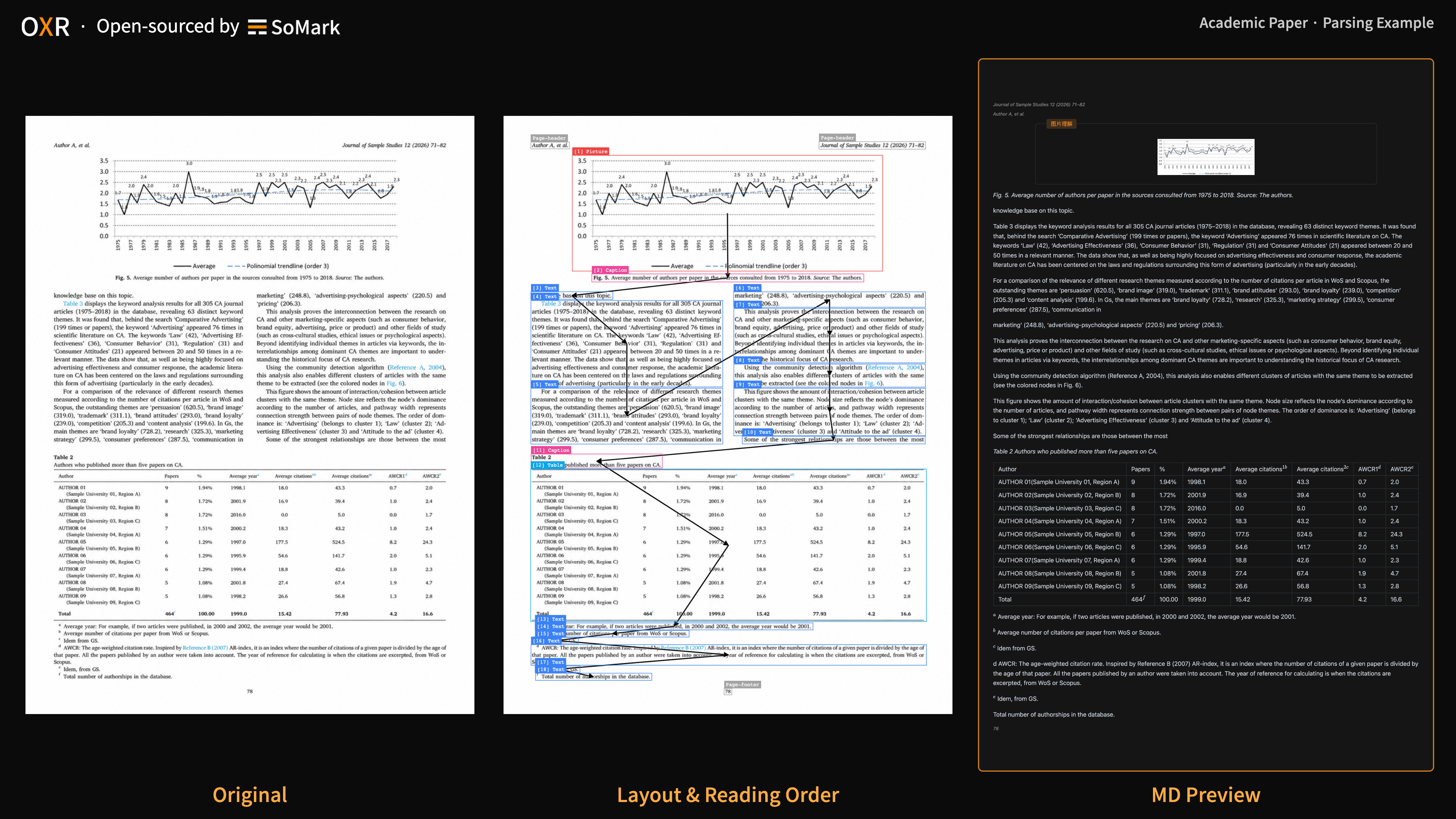
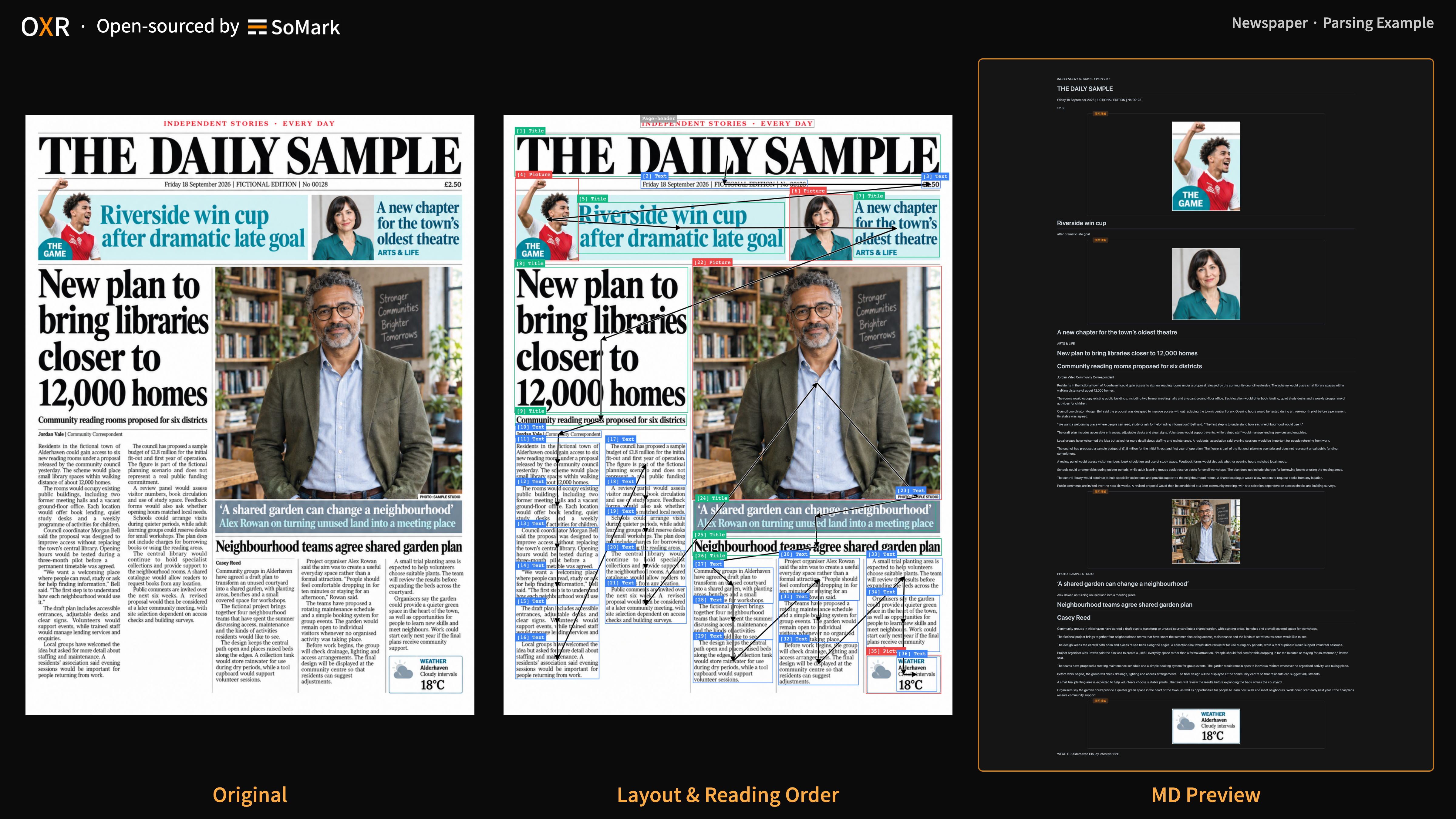
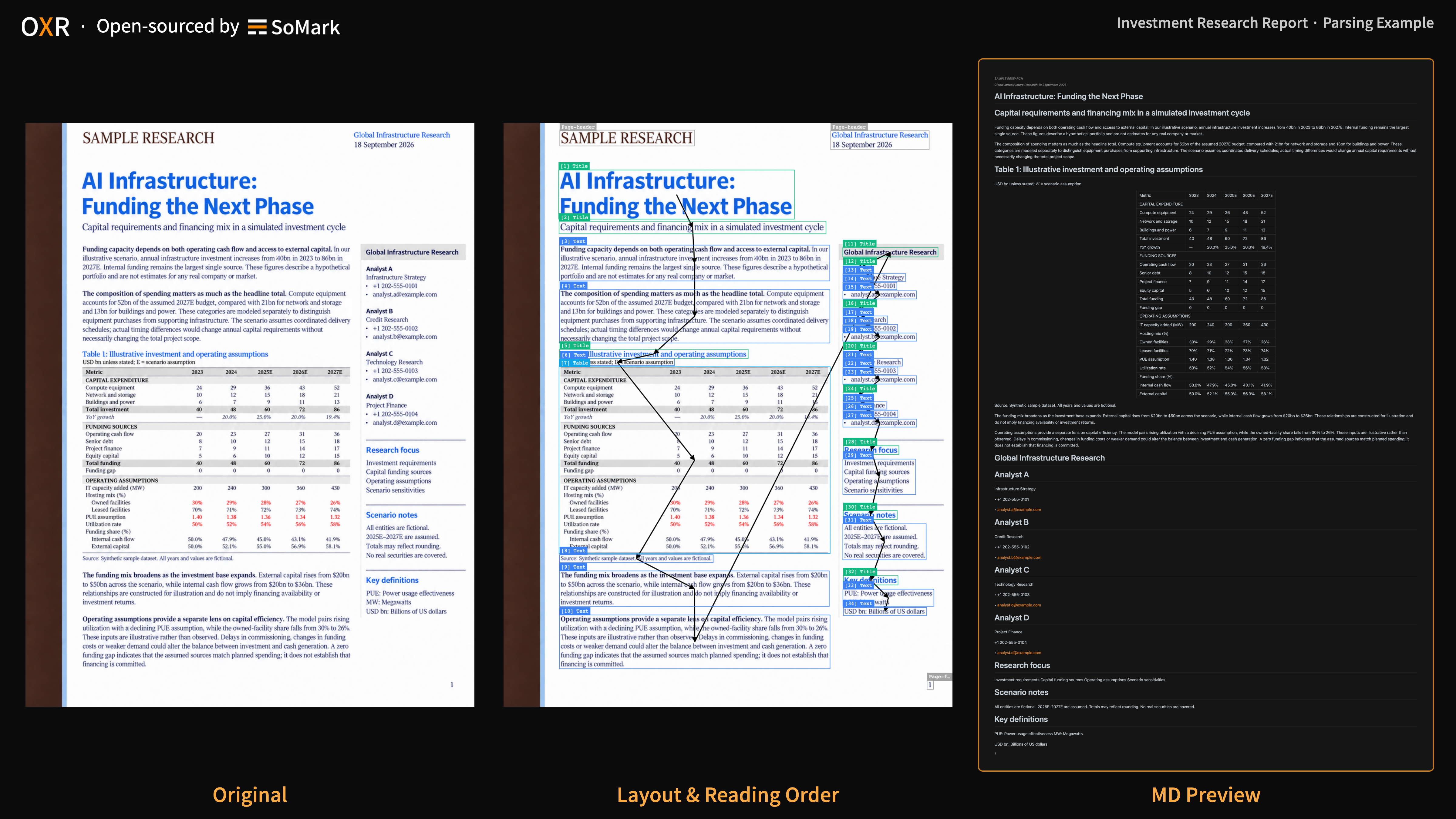
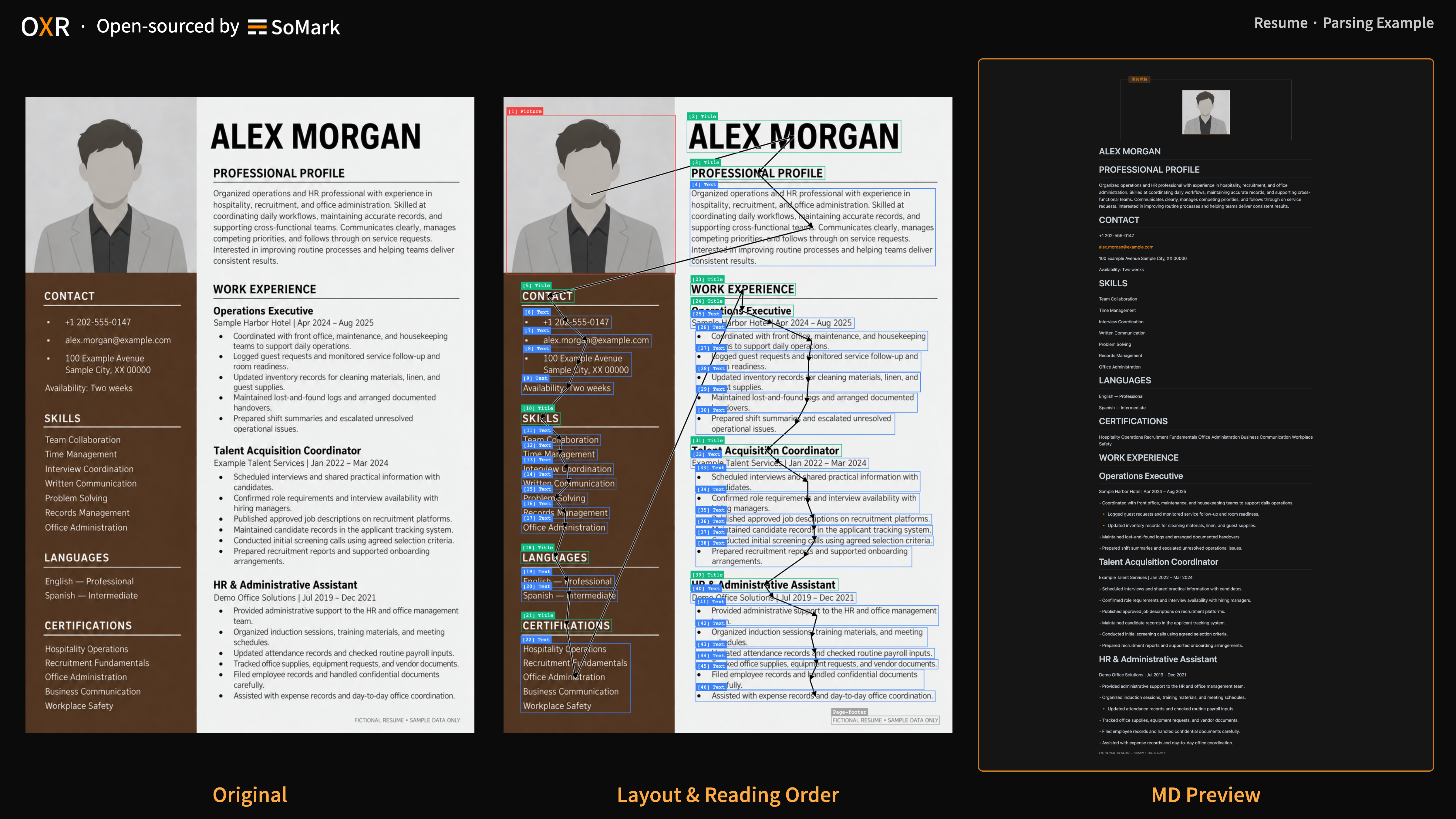
下方展示不同文档类型的 OXR 解析示例，点击图片可查看原图。

<table>
  <tr>
    <td align="center" valign="top"><strong>A3试卷</strong><br/><a href="https://raw.githubusercontent.com/SoMarkAI/image_bed/main/OXR_README/assets/parsing_examples/a3_exam_paper.png"><img src="https://raw.githubusercontent.com/SoMarkAI/image_bed/main/OXR_README/assets/parsing_examples/a3_exam_paper.png" alt="A3试卷" width="280" /></a></td>
    <td align="center" valign="top"><strong>中文手写</strong><br/><a href="https://raw.githubusercontent.com/SoMarkAI/image_bed/main/OXR_README/assets/parsing_examples/chinese_handwriting.png"><img src="https://raw.githubusercontent.com/SoMarkAI/image_bed/main/OXR_README/assets/parsing_examples/chinese_handwriting.png" alt="中文手写" width="280" /></a></td>
    <td align="center" valign="top"><strong>代码块</strong><br/><a href="https://raw.githubusercontent.com/SoMarkAI/image_bed/main/OXR_README/assets/parsing_examples/code_block.png"><img src="https://raw.githubusercontent.com/SoMarkAI/image_bed/main/OXR_README/assets/parsing_examples/code_block.png" alt="代码块" width="280" /></a></td>
  </tr>
  <tr>
    <td align="center" valign="top"><strong>化学方程式</strong><br/><a href="https://raw.githubusercontent.com/SoMarkAI/image_bed/main/OXR_README/assets/parsing_examples/chemical_equation.png"><img src="https://raw.githubusercontent.com/SoMarkAI/image_bed/main/OXR_README/assets/parsing_examples/chemical_equation.png" alt="化学方程式" width="280" /></a></td>
    <td align="center" valign="top"><strong>化学结构式</strong><br/><a href="https://raw.githubusercontent.com/SoMarkAI/image_bed/main/OXR_README/assets/parsing_examples/chemical_structure.png"><img src="https://raw.githubusercontent.com/SoMarkAI/image_bed/main/OXR_README/assets/parsing_examples/chemical_structure.png" alt="化学结构式" width="280" /></a></td>
    <td align="center" valign="top"><strong>复杂公式</strong><br/><a href="https://raw.githubusercontent.com/SoMarkAI/image_bed/main/OXR_README/assets/parsing_examples/complex_formula.png"><img src="https://raw.githubusercontent.com/SoMarkAI/image_bed/main/OXR_README/assets/parsing_examples/complex_formula.png" alt="复杂公式" width="280" /></a></td>
  </tr>
  <tr>
    <td align="center" valign="top"><strong>复杂表格</strong><br/><a href="https://raw.githubusercontent.com/SoMarkAI/image_bed/main/OXR_README/assets/parsing_examples/complex_table.png"><img src="https://raw.githubusercontent.com/SoMarkAI/image_bed/main/OXR_README/assets/parsing_examples/complex_table.png" alt="复杂表格" width="280" /></a></td>
    <td align="center" valign="top"><strong>学术论文</strong><br/><a href="https://raw.githubusercontent.com/SoMarkAI/image_bed/main/OXR_README/assets/parsing_examples/academic_paper.png"><img src="https://raw.githubusercontent.com/SoMarkAI/image_bed/main/OXR_README/assets/parsing_examples/academic_paper.png" alt="学术论文" width="280" /></a></td>
    <td align="center" valign="top"><strong>报纸</strong><br/><a href="https://raw.githubusercontent.com/SoMarkAI/image_bed/main/OXR_README/assets/parsing_examples/newspaper.png"><img src="https://raw.githubusercontent.com/SoMarkAI/image_bed/main/OXR_README/assets/parsing_examples/newspaper.png" alt="报纸" width="280" /></a></td>
  </tr>
  <tr>
    <td align="center" valign="top"><strong>研报</strong><br/><a href="https://raw.githubusercontent.com/SoMarkAI/image_bed/main/OXR_README/assets/parsing_examples/research_report.png"><img src="https://raw.githubusercontent.com/SoMarkAI/image_bed/main/OXR_README/assets/parsing_examples/research_report.png" alt="研报" width="280" /></a></td>
    <td align="center" valign="top"><strong>简历</strong><br/><a href="https://raw.githubusercontent.com/SoMarkAI/image_bed/main/OXR_README/assets/parsing_examples/resume.png"><img src="https://raw.githubusercontent.com/SoMarkAI/image_bed/main/OXR_README/assets/parsing_examples/resume.png" alt="简历" width="280" /></a></td>
    <td align="center" valign="top"><strong>英文手写</strong><br/><a href="https://raw.githubusercontent.com/SoMarkAI/image_bed/main/OXR_README/assets/parsing_examples/english_handwriting.png"><img src="https://raw.githubusercontent.com/SoMarkAI/image_bed/main/OXR_README/assets/parsing_examples/english_handwriting.png" alt="英文手写" width="280" /></a></td>
  </tr>
</table>

## How it works

<a id="how-to-works"></a>

### 技术架构

本系统分为Layout Analysis模型和OXR两个模型，我们将Reading Order并入了Recognition阶段，并且发生在同一个模型上。这样的设计对于速度、效果都更加有效。

且如此设计还有一个特别的目的，方便定制。我们发现Layout Analysis一直是各个领域文档发生差异最大的模块，文档解析服务商通常在提供服务时，这一部分是最需要定制开发的。而现在的文档解析工具要么将其交给Recognition模型承担，要么设计特殊模型带上Reading Order任务。我们如此设计实现了最简洁的Layout Analysis接入方式，任何Layout Analysis模型都可以和OXR模型工作的很好。

![](https://raw.githubusercontent.com/SoMarkAI/image_bed/main/OXR_README/assets/oxr_pipeline.png)


### RSI 闭环提升

对于文档解析这样一个有“标准答案”的任务，我们一直期待有一套工程系统能够帮助核心模型自我提升。OXR的RSI方案如下图所示。对于错样本、弱样本，这套RSI方案可以针对性的进行优化和提升，无需人类参与标注，这让我们的迭代速度空前的快。

![](https://raw.githubusercontent.com/SoMarkAI/image_bed/main/OXR_README/assets/oxr_rsi_loop.png)


## Quick Start

<a id="free-api"></a>

### 0. 🔥 🆓 Free API

OXR 提供免费 API，无需注册或申请 API 密钥，即可用自己的文档测试解析效果。

我们将持续提供免费API服务，直至我们的服务器顶不住压力。

⚠️ 注意：不建议将 Free OXR API 用于线上环境，我们没有稳定性保证，也设置了排队机制，速率略有浮动

| Online Demo | https://free-oxr.somark.ai | https://free-oxr.somark.cn |
|-|-|-|
| API地址 | https://free-oxr.somark.ai/api/v1 | https://free-oxr.somark.cn/api/v1 |
| 对接文档 | [https://docs.somark.ai/api-reference](https://docs.somark.ai/api-reference) | https://docs.somark.cn/api-reference |

> somark.cn是somark.ai的镜像源地址，可以根据所在地区自行选择

OXR 系统的 文档解析 API 接口和 SoMark 官方的文档解析 API 接口兼容，所以你可以直接使用somark-py、somark-js这些SoMark官方文档解析 CLI 工具替换 **Base URL** 后直接使用。支持的接口和输出格式见 1.4。

```Bash
# using python
pip install somark
# or using js
npm install -g somark-js

somark --base-url https://free-oxr.somark.ai/api/v1 --api-key dummy \
  parse document.pdf --formats md,json --out ./parsed-output/
```


### 1. 本地启动

```Plain Text
操作系统：Linux
GPU：NVIDIA（支持 BF16）
驱动：NVIDIA 驱动（兼容 CUDA 13.0）
Python：3.12（模型下载／源码启动）
起步显存：单卡 24GB（低并发试用）
推荐显存：单卡 ≥48GB（长文档／较高并发）
```

#### 1.1 下载代码和模型

| 模型 | 下载链接 | 精度 | 是否带版面分析小模型 |
|-|-|-|-|
| OXR-1.0 | [🤗 Hugging Face ](https://huggingface.co/SoMarkAI/OXR-1.0)  <br/>[🤖 ModelScope](https://modelscope.cn/models/SoMark/OXR-1.0) | BF16 | 是，在layout_analysis文件夹中 |

先获取代码并准备模型下载环境：

```Bash
git clone https://github.com/SoMarkAI/OXR.git
cd OXR

# pip install -U huggingface_hub
hf download SoMarkAI/OXR-1.0 --local-dir ./models/OXR-1.0

# or using ModelScope
# pip install -U modelscope-hub
modelscope download SoMark/OXR-1.0 --local_dir ./models/OXR-1.0
```

#### 1.2 启动服务

##### 1.2.1 Docker 启动（推荐）

推荐使用docker配置服务，一次性启动所有服务。

```Bash
docker build -f docker/Dockerfile.allinone -t oxr-1.0 .
docker run --rm --gpus all --ipc=host \
  -p 127.0.0.1:8000:8000 \
  -v "$PWD/models/OXR-1.0:/models/oxr-model:ro" \
  oxr-1.0
```

等待启动日志显示服务就绪后，打开 http://localhost:8000/demo 或 http://localhost:8000/docs 。
首次启动可能较慢，默认启动等待上限为 900 秒。
更多高级参数和使用示例，可以前往 How to use OXR 了解。


##### 1.2.2 源码启动

完成代码和模型下载后，分别启动以下三个服务。各服务使用独立的进程和虚拟环境，所有命令均在 OXR 仓库根目录执行。文档解析 API 服务依赖于 OXR 模型和 Layout Analysis 模型这两个服务，因此启动顺序上，需要先启动两个模型服务API。

**OXR 模型服务（端口 8080）**

OXR 支持 vLLM，但当前 vLLM 官方还未支持OXR模型推理，我们在Huggingface权重文件夹中提供了 out-of-tree 的 plugin 以及加载脚本，无需重新编译，可以在 vLLM 官方 docker 或 CLI 中直接用 plugin 启动。

```Bash
# pip install vllm==0.25.1 transformers==5.13.1

MODEL_PATH="$PWD/models/OXR-1.0" \
  bash services/oxr/start_vllm.sh \
  --gpu-memory-utilization 0.70 --max-num-seqs 16
```

**Layout Analysis 模型服务（端口 8081）**

Layout Analysis 模型权重包含在前面下载的 OXR 模型权重文件夹中。

```Bash
# pip install torch==2.11.0 torchvision==0.26.0 --index-url https://download.pytorch.org/whl/cu130
# pip install -r services/layout_analyze/requirements.txt

MODEL_PATH="$PWD/models/OXR-1.0/layout_analysis/last.pth" \
DFINE_DEVICE=cuda \
  python -m uvicorn dfine_la.api:app \
  --app-dir services/layout_analyze \
  --host 127.0.0.1 --port 8081 --workers 1
```

**文档解析 API（端口 8000）**

把项目中提供的`config.example.yaml`复制一份为`config.yaml`，将前面两个启动好的服务地址填写在`layout_analyze_model`和`oxr_model`的 url 参数中。

```Bash
# pip install -c docker/requirements.allinone.txt .

oxr serve --config config.yaml \
  --host 127.0.0.1 --port 8000 --workers 1
```

三个服务启动后，Demo 和解析接口的使用方式与 Docker 启动相同，见 1.3 和 1.4。

#### 1.3 打开可视化 Demo

打开 http://localhost:8000/demo ，上传 PDF 或图片，可查看原文件、Markdown 预览、源码、版面框与阅读顺序，并下载 Markdown。

Demo 使用临时文件缓存，默认有效期为 1 小时，处理期间会续期。缓存过期或被清理后无法继续访问，需及时下载结果。

#### 1.4 请求解析

OXR 的 API 与 SoMark API 兼容，部分特殊能力 OXR 不支持，但 SoMark 的生态完全支持部署的 OXR 服务。可以前往 [SoMark 官网](https://somark.ai) 参考：[API 接口文档](https://docs.somark.ai/api-reference)。

直接访问解析接口：

```Bash
curl --fail-with-body http://localhost:8000/v1/parse/sync \
  -F 'file=@document.pdf' \
  -F 'api_key=dummy' \
  -F 'output_formats=markdown' \
  -F 'output_formats=json'
```

SoMark 为解析业务封装了完善的 CLI & SDK，并提供了 python 和 js 两种语言的支持。本 OXR 项目兼容该 CLI 和 SDK 的文档解析接口，可以直接替换baseURL后使用。更多信息可以查阅该文档：https://docs.somark.ai/en/cli-sdk

```Bash
pip install somark

somark --base-url http://localhost:8000/v1 --api-key dummy \
  parse document.pdf --formats md,json --out ./parsed-output/
```

## 生态支持

SoMark 团队围绕文档解析工作开发了一系列生态工具，如果能够提供到帮助，请帮忙点一个 ⭐ Star。

|  | 一句话简介 | 项目地址 |
|-|-|-|
| SoMarkDown | SoMark、OXR 官方的 Markdown 解析与渲染库 | https://github.com/SoMarkAI/SoMarkDown |
| SoMarkDownViewer | SoMarkDown 的实时编辑应用 | https://github.com/SoMarkAI/SoMarkDownViewer |
| SoPDF | 高性能、宽松开源许可的 PDF 处理库 | https://github.com/SoMarkAI/SoPDF |
| Docision | 面向文档场景的多模态Jev | https://github.com/SoMarkAI/docision |
| somark-py | 服务SoMark、OXR的官方Python SDK & CLI | [https://github.com/SoMarkAI/somark-py](https://github.com/SoMarkAI/somark-py) |
| somark-js | 服务SoMark、OXR的官方JS / TS SDK & CLI | https://github.com/SoMarkAI/somark-js |

---

<div align="center">
<img src="https://raw.githubusercontent.com/SoMarkAI/image_bed/main/OXR_README/assets/OXR_Star_on_GitHub.gif" width="800" />
</div>

## 引用

当前可引用 OXR-1.0 开源项目，技术报告发布后再补充论文引用。

```bibtex
@misc{somark2026oxr,
  author = {{SoMark}},
  title = {{OXR-1.0}},
  url = {https://github.com/SoMarkAI/OXR},
  note = {GitHub repository}
}
```

## License

OXR 采用 [OXR Open Source License](./LICENSE)，基于 Apache 2.0 的自定义许可证，附带额外条款。

如果您需要更进一步的服务，可联系SoMark团队→[somark.ai](http://somark.ai)

## 社区

欢迎加入 OXR 社区，交流文档解析实践、反馈使用问题，获取最新动态。

- [Discord](https://discord.gg/msCPj2AtNN) — 交流 OXR 使用经验、讨论技术问题，分享你正在做的项目。
- [X / Twitter](https://x.com/somarkai) — 关注 OXR 版本发布与 SoMark 最新动态。
- [GitHub Issues](https://github.com/SoMarkAI/OXR/issues) — 提交问题、提出功能建议，跟进处理进展。
- **微信** — 扫描下方二维码，加入 OXR 微信交流群，与其他用户交流实践心得。

<p>
  <img src="https://raw.githubusercontent.com/SoMarkAI/OXR/main/assets/wechat-community.png" alt="OXR 微信交流群二维码" width="200" />
</p>